Want to ensure your message sticks, no matter who's reading? Check out these tips.
We are adding tips as we go. These are meant to be used in a variety of situations.
Tip #1 - Use Simple Language, No Jargon
Avoid excessive industry jargon and complex terminology. Use clear, straightforward language to ensure your content is easily understood by all users, including those with cognitive disabilities.
Nobody's got time for "synergy" or "paradigm shifts."
Don't assume all users have the same knowledge. Explain acronyms and provide necessary context to accommodate users with varying cognitive abilities and backgrounds. You can provide your audience with tools to process your content differently. AI-generated summaries are an example of this.
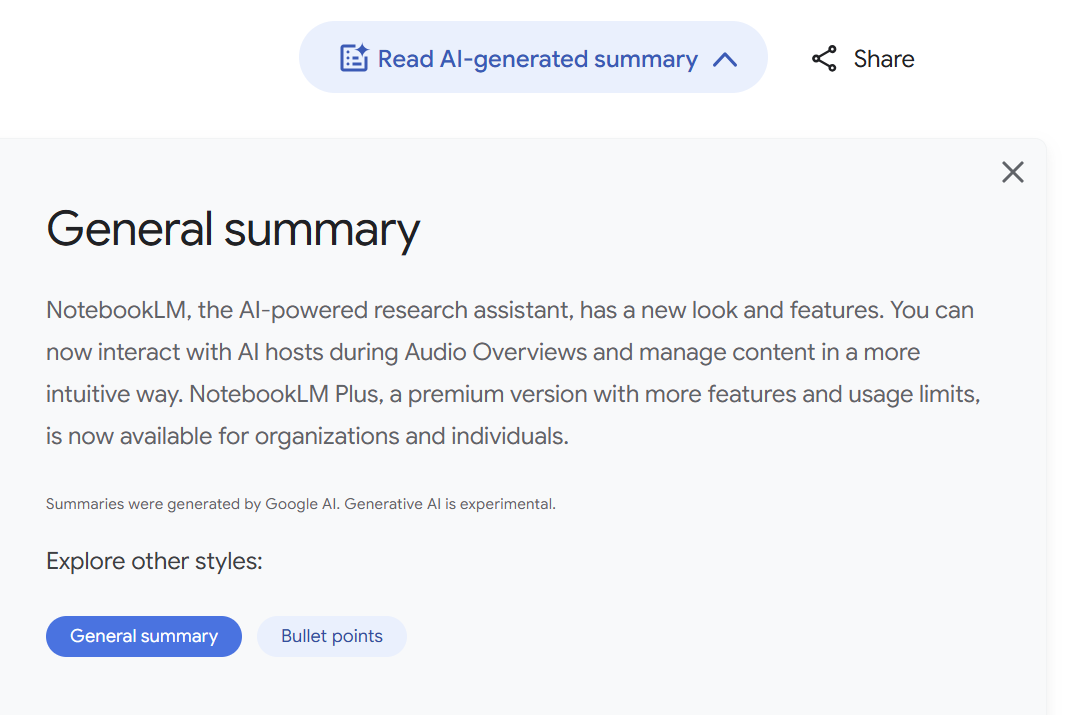
This is an example from the Google blog.
Source: WCAG 2.1, Success Criterion 3.1.3: Unusual Words.
Tip #2 - Use Clear Structure & Navigation
Implement clear headings, subheadings, and bullet points to guide users through your content. This helps users with cognitive disabilities navigate and understand the information more easily.
Guide our eyes to what matters, and we'll love you for it!
Source: WebAIM's Cognitive Disabilities: Design Considerations
Tip #3 - Implement Visual Cues
Icons, color coding, highlighting are not just eye candy. They help keep our attention where you want it. Just remember, not everyone sees color the same way, so double-check your choices
I have no design skills to speak of but I still got you to pay attention!
Tip #4 - Design for Attention Spans
Neurodivergent brains need a roadmap, not a maze. We've got short attention spans, folks. Get to the point, and get there fast. Front-load your content with the juicy bits. If you want a break down of content structure that's designed with human attention spans, crawlers and more, check out this fantastic redux by David Broderick on LinkedIn.
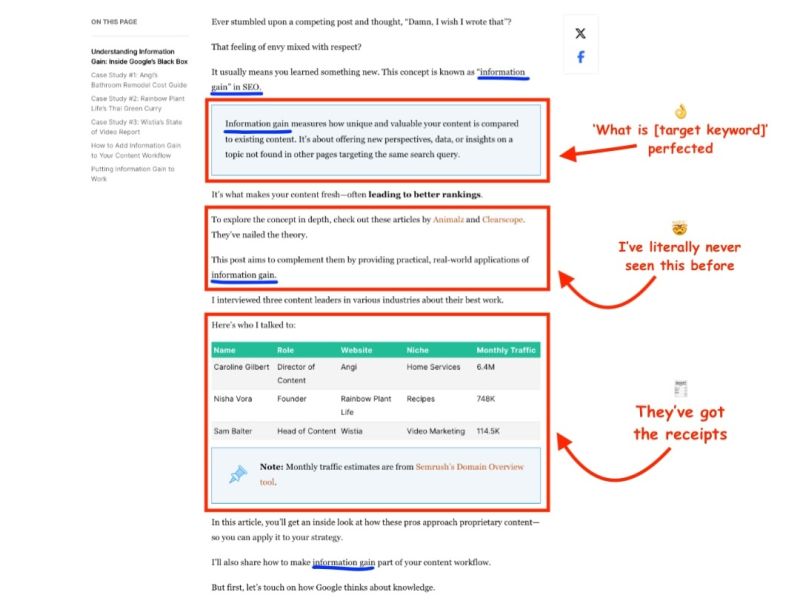
This is an example from Backlinko's blog.
Tip #5 - Use Active Voice
Use active voice in your content. It's clearer and more direct, making it easier for users with cognitive disabilities to understand.
Source: Plain Language Guidelines by plainlanguage.gov
Tip #6 - Ensure Error-Free Content
Proofread meticulously to eliminate typos and errors, as these can be particularly confusing for users with cognitive disabilities.
"You know, when you read something that looks kind of legit, like a well-done phishing email, but then there is a typo or a difference in fonts that makes our alarm sirens go off?" - Giulia Panozzo
Sources:
Tip #7 Ensure High Color Contrast
Use high contrast color combinations to improve readability and visual processing for all users, including those with cognitive disabilities.
Source: WCAG 2.1, Success Criterion 1.4.3: Contrast (Minimum).
Interesting accessibility tidbit: color blindness (color vision deficiency, or CVD) affects approximately 1 in 12 men (8%) and 1 in 200 women.
If you want to ensure your content is properly processed by the eyeballs across genders, always account for the fact that red-green color vision deficiency is more common.
Tip #8 - Offer Multiple Content Formats
Provide content in multiple formats (e.g., text, audio, video) to allow users to choose the format that best suits their cognitive needs and preferences. Here's an example of what can quickly be done in regards to that:
How I Turned My Resume Into a Podcast with Google’s NotebookLM AI
Source: W3C's Web Accessibility Initiative (WAI) on Diverse Abilities and Barriers.
Tip #9 - Maintain Consistent Text Orientation
Keep text horizontal, as tilted or vertical text can be challenging for users with cognitive disabilities to read and comprehend.
One study (Wigdor & Balakrishnan, 2005) found that reading text tilted 45 degrees in any direction was, on average, 52% slower than reading normally oriented text.
Sources:
Wigdor & Balakrishnan: Empirical Investigation into the Effect of Orientation on Text Readability in Tabletop Displays
Tip #10 – Reduce Cognitive Load with Progressive Disclosure
Don’t overwhelm users with all the information at once. Use progressive disclosure: reveal details step by step, letting users focus on one decision or task at a time. This is especially helpful for users with ADHD, autism, or anyone who gets easily overloaded by dense interfaces.
Tip #11 – Use Consistent, Predictable Layouts
Keep navigation, buttons, and page structure consistent across your site or product. Predictability helps users with cognitive disabilities know what to expect and reduces the mental effort needed to find information or complete tasks.
Sources: Recite Me’s guide to cognitive accessibility; MDN Web Docs on cognitive accessibility.
Tip #12 – Give Users Control (Especially Over Time Limits and Animations)
Allow users to pause, stop, or adjust moving, blinking, or scrolling content. Avoid unexpected pop-ups or auto-advancing carousels. If you must use time limits (for forms, quizzes, etc.), let users extend or remove them.
Sources: Recite Me’s guide to cognitive accessibility; MDN Web Docs on cognitive accessibility.
Tip #13 - Avoid Justified Text
Use left-aligned text instead of justified text, as justified text can create uneven spacing that's harder for users with dyslexia to read.
Tip #14 – Test with Real Users with Cognitive Disabilities
Checklists are helpful, but nothing beats real feedback. Include neurodivergent users in your usability testing to uncover barriers you might miss. Their insights can reveal confusing patterns, unclear instructions, or overwhelming layouts you didn’t anticipate.
These tips, rooted in real-world research and inclusive design, help ensure your digital content is welcoming and usable for every kind of brain—because accessibility is about real people, not just compliance. Cognitive accessibility isn't some niche extra credit task. It's fundamental digital kindness.